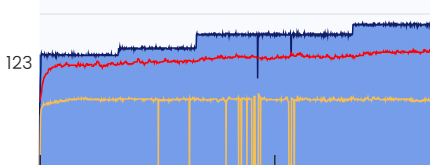
Even with the latest app update I’m still dropping out with my cadence sensor. It reconnects faster than before the update, but still periodically drops out.
When connected to my bike computer I have zero issues with dropping any Bluetooth connections, so I don’t think the issue is the sensor.
I’m running 3 Bluetooth connections to my iPhone (trainer, cadence sensor, heart rate monitor).
I had similar with my HRM yesterday and found that going into the devices area of the app and manually disconnecting and then reconnecting the HRM fixed it.
Maybe doing the same with your cadence sensor is worth a try?
Ok you just saved me!!! I had a few others users that emailed me having problems with devices directly connected to their phones but I did not realize that was the problem. We must have changed something regarding these direct connections. I should be able to improve this.
I’ve done that several times with no change, unfortunately. I’ve added and removed the sensor multiple times thinking it may wind up getting a “better” connection, but no luck.
Whatever change was made in today’s iOS app release created a new issue.
When my cadence sensor drops out, it’s now impossible to maintain ERG power until it reconnects. The power drops by over 50% until the cadence sensor reconnects.
I had to disconnect my cadence sensor and switch to using the trainer’s cadence calculation because it was impossible to ride with the disconnects.
From bad to worse… so sorry, really I think we are almost through this mess. What happens when a device disconnects and reconnects is it might take over control. So double whammy. Click to view the devices screen to see if you are losing services for your trainer. By next week all this should be resolved assuming my fix for the dropped connections is right. Tomorrow I will see if I can find a device in my house that will disconnect. I own about 30 random devices but typically only test with about 5 or so of them.
I now have disconnects with my garmin watch but only when paired directly to the phone, so maybe this disconnects is the same as you are seeing. I can also clearly see that devices change when the HR disconnects so I have fixed all that. I am very hopeful this will be resolved now.
I’m still getting dropouts with the new update, but it seems to connect back faster than before. I may just have to live with it or stop using a cadence sensor and let my trainer guestimate my RPMs.
One thing that might have changed is we might have masked the dropouts before. Filled in short zeros with recent values and not shown the green popup. It’s possible this is low battery? Or some other wireless interference. I think most apps try to eliminate these drops. Or maybe there is still just a bug My tester did see something like this 1 time and then never again. We will keep investigating and seeing if others have this.
I thought it may be low battery as well, but I changed the battery and the same result. I will say, I zoomed in on the disconnects in Intervals.icu cadence graph, and each disconnect on my last workout was less than 1/10 of a second. So it’s definitely a lot faster on reconnecting when it drops - so much so that Strava doesn’t even show the disconnect on its cadence graph.
What is interesting though is the only thing I’ve had drop is my cadence sensor. My HRM and trainer connection has been rock solid. I’m not sure why. I guess it’s possible it is the sensor itself, but I don’t have any disconnects showing on my bike computer when I do road rides.
I spoke too soon…today when the cadence kept disconnecting, the power disconnected when the cadence was trying to reconnect. I have no idea what’s going on or why. The battery on the sensor isn’t low at all and I’m not getting disconnects on my bike computer. I’m not sure if TD doesn’t like the number of devices I have connected (3) or what. I suppose I’ll just have to remove the cadence sensor at this point.




 My tester did see something like this 1 time and then never again. We will keep investigating and seeing if others have this.