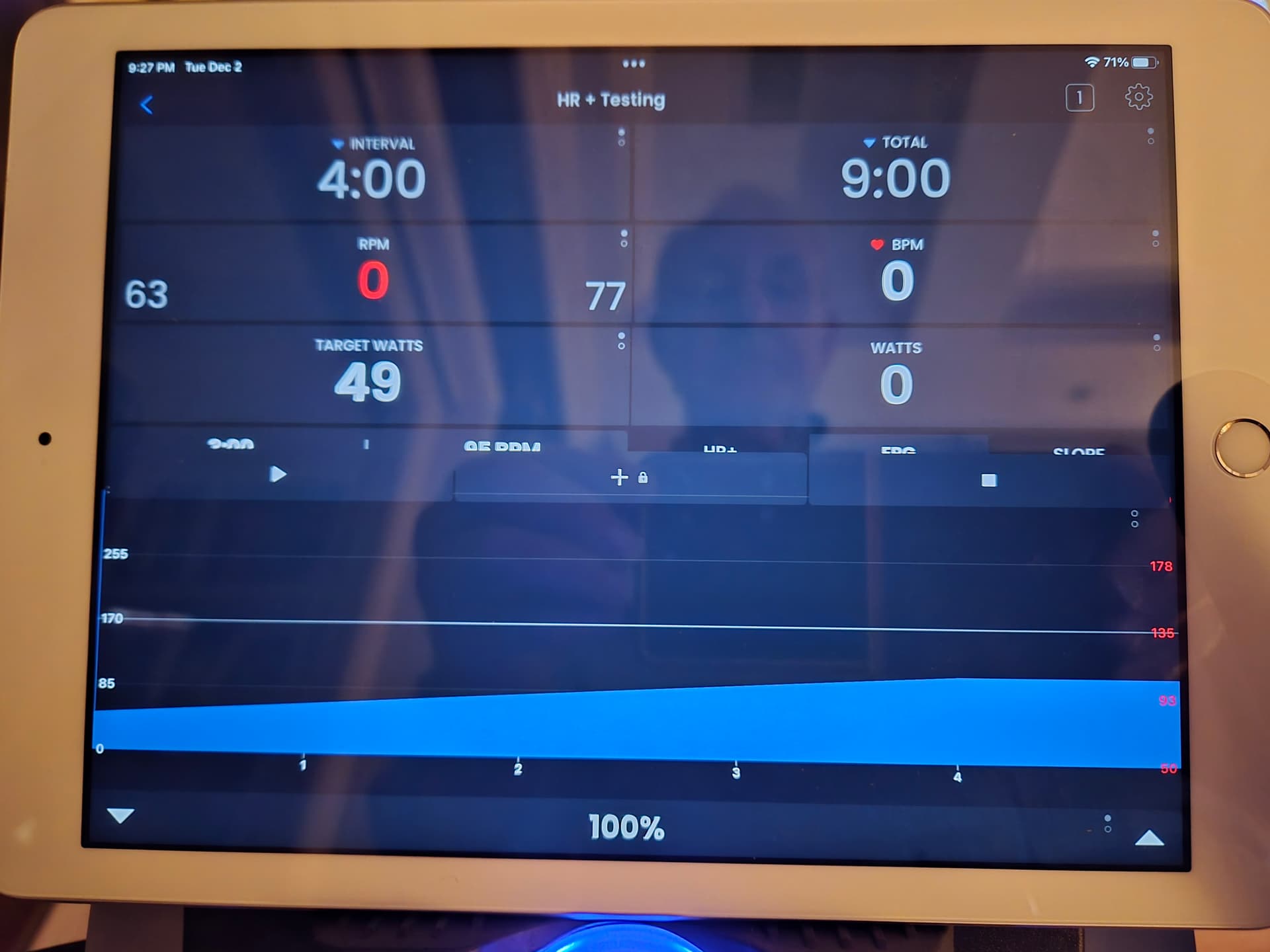
For some reason, either in portrait or landscape orientation, my (older) iPad’s display fails to demonstrate the row of buttons which contains ERG, HR+ (etc.). Because of that, I’m unable to switch between these modes or increase/decrease Watts/FTP%.
It seems that there is an overlap of this row of buttons due to a row of 3 buttons which are likely meant to be below that obstructed row.
For my purposes, the upper portion of the graph area will NEVER be utilized, since I doubt that I’ll ever reach even 300 on the Y-axis. Is there any way to resize the graph area in order to have access to the missing row of buttons??
No, the device is controlling my bike. The display should show the row of buttons with ERG, HR+, Slope, etc., but these are covered up by the row consisting buttons for “Start”, “+ with a Padlock?” and “Stop” which are above the graph. Here’s the photo during one of my saved workouts…
It’s an older iPad (5th Generation). The overlap occurs in portrait orientation, as well. I just downloaded the app to my Samsung phone and there’s no overlap for the same workout. It must be a glitch in that model iPad.