My smart trainer works perfectly in ERG mode in other apps, but in TrainerDay on macOS the actual power not really locks onto the ERG target even though the trainer shows as “smart trainer / controllable” and only one connection is active. Firmware is up to date, ERG is selected, no other devices/apps are connected, and I’d really appreciate ideas on what else to check or try.
Try reconnecting the trainer, restarting the app and checking Bluetooth permissions on macOS. You can also test another connection method to see if the issue persists.
1 Like
Yes, should work fine, I have V5 and a mac user and it works fine for me. As Austin suggested something should fix it.
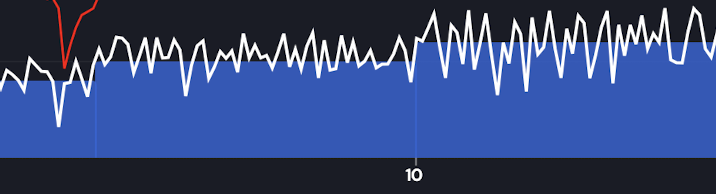
I have noticed 1-3 second drop outs on my last several rides in erg mode. Not as wild as those but just 5-15 watt drops before returning to stable. It has been multiple times a minute. I wasn’t too concerned about it given the low volume and intensity and figured I’d trouble shoot before asking about it, but then I saw this post and thought I’d add to it. Wahoo Kickr Core 1 at the moment.

Are you doing power match and/or our desktop app?
Using IOS mobile app. No power match (no power meter on my indoor set up-just the trainer), power smoothing: smart. No changes in months to the set up/app settings.
If I get a ride in today, I will try a recalibration first. The issue started on June 18, it was fine on June 17, so it was after the last IOS update on June 12 where your fix was for Wahoo trainers. Don’t think that applied to mine anyway. I have not updated the app, still running 9.9.1.
Not sure it’s related, but I have had to kill the app several times when starting as it has overshot the set power in erg mode a number of times. This started about the same time as the power drop out issue. I’ve had to kill it and restart it between 1-5 times to get it to work properly so my warm up didn’t start out to high.
So it sounds as though updating your IOS broke the app. 9.9.1 was released May 2. So I would uninstall our app and reinstall or just update to the latest version of our app
1 Like
Still happening, 3 days in a row. I updated both the TD app, the Wahoo app and did a spindown calibration in the Wahoo app before the 1st of these last three workouts. I did not update the IOS, that was a misunderstanding.
It’s not really bothering me at this moment and intensity level, and it seems like no one else is reporting this issue, so it’s likely on my end. Unless it’s not and other’s just haven’t spoke up. It’s just odd that it popped up out of nowhere and nothing I’ve done has fixed it.

So strange, but the other thing is it’s not hitting your targets at the higher watts. Did you try changing gears on the bike to see if it changes thresholds of where this happens?
No gears, Zwift cog. Yes, I have noticed that my actual watts tend to be 1 watt below the target. If you are looking at my activities page, then there are times when there is a dark blue gap. Most of the ride preceding the recent mid June onward, that is me dropping the power manually to respect my HR cap. I go back and forth on HR+ and just using a created workout where I know I’m close on the power. This is a guardrail I’ve had to set up for my specific circumstances. I’m likely to go back to HR+ once a bit of resilience has been built back into the system.
The other thing I mentioned before and I’ve taken steps going forward to try to avoid this, but it still happens sometimes, is when i start the session, it overshoots the target watts and won’t settle back to the target. I have to kill the app and restart it, sometimes multiple times before it works correctly.
Am I looking at those drops are actually in HR+? If so, that gives me new ideas.
I think so too.
They are not in HR+. It’s a fixed erg workout, with 2-minute step ups for the first few minutes until I reach my target.
Ok I really think this is something on your end, but different bluetooth libraries might be better at dealing with this, so it can be a combination. Did you try our desktop app also? This is more like wireless interference, something in your house. Turning off wifi router or other stuff might isolate it.
I have not tried the desktop app yet. Will give it a go. I’m guessing it likely is on my end as I don’t think anyone else has really reported this sort of issue. Not sure what causes it, nothing has changed in my set up pre and post June 17 when this issue popped up. Only updated the apps after this issue persisted and nothing new has been connected. My trainer doesn’t have wifi ability so I’m not sure how that would impact things. I’ll continue to troubleshoot it and if I find a fix I’ll report back.
Thanks for your continued support and an awesome product.
1 Like