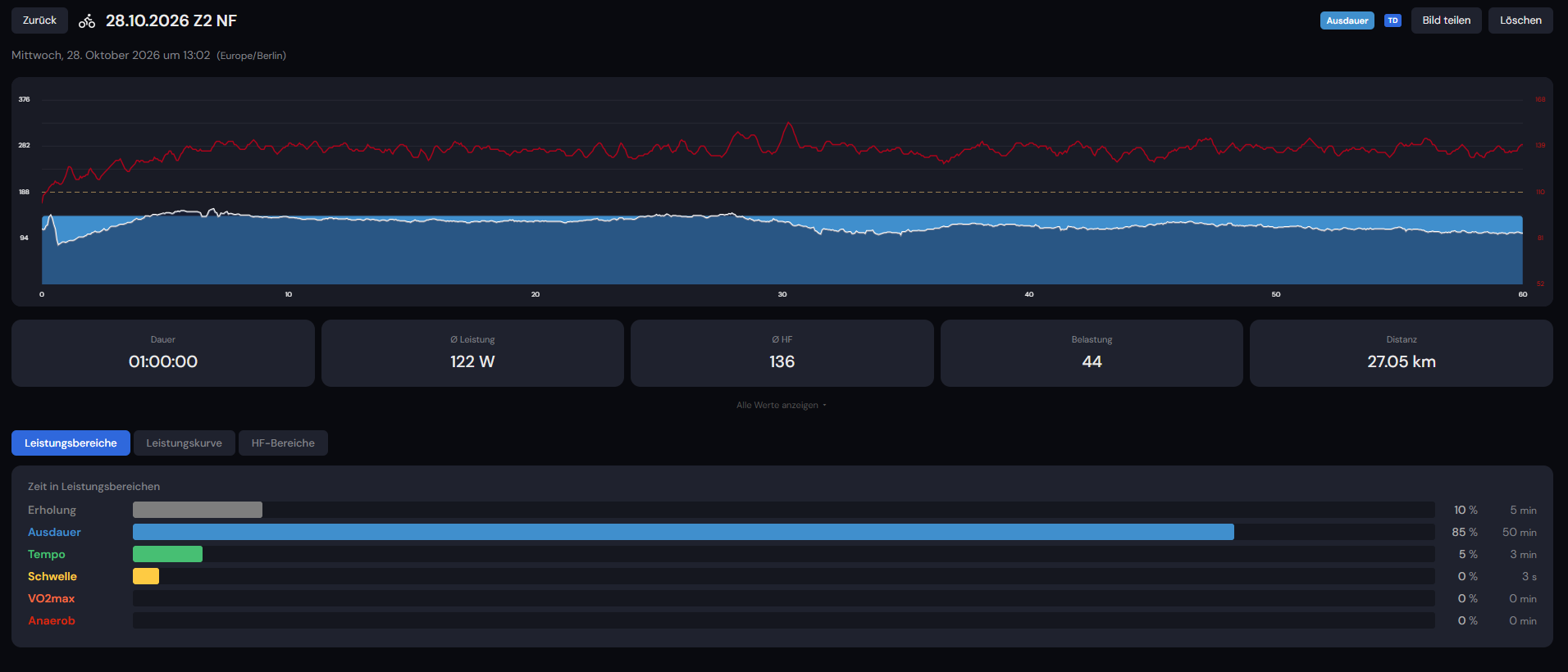
I am having an issue with my recent workout performed on October 28, 2026. The activity (“28.10.2026 Z2 NF”) is perfectly visible inside my desktop app’s activity history, showing all the graphs, averages (60 min, 122W, 135 bpm, 27.05 km, 84 rpm), and training zones.
However, it completely refuses to sync to the TrainerDay website. When I click on the activity to open the detail view in the desktop app, there is absolutely no option to download or export the FIT/TCX file. The only available action is to export/share the image of the graph.
Is there a way you can manually force-sync this activity from the server-side backend, or tell me how to extract the raw data from the local desktop app storage so I don’t lose the file for Strava?
Ok I will figure this out. I saw some errors lately in this process. It might require an app update and I might have to create a new version that might be needed to resolve it. I will let you know by tomorrow. Just don’t delete or reinstall the app and we will save it.
Sorry I found the issue. I think we will be able to get your workouts uploaded. Sorry I thought I had fixed this yesterday with another issue but I did not. I will give you message when it is fixed and hopefully your workouts fly through. I will make sure TCX is downloadable locally also.
If you reopen the app now, we now have better monitoring to see why it is getting rejected and we are saving it on the server so we can fix it. We also are adding direct TCX download so you should be able to export also.