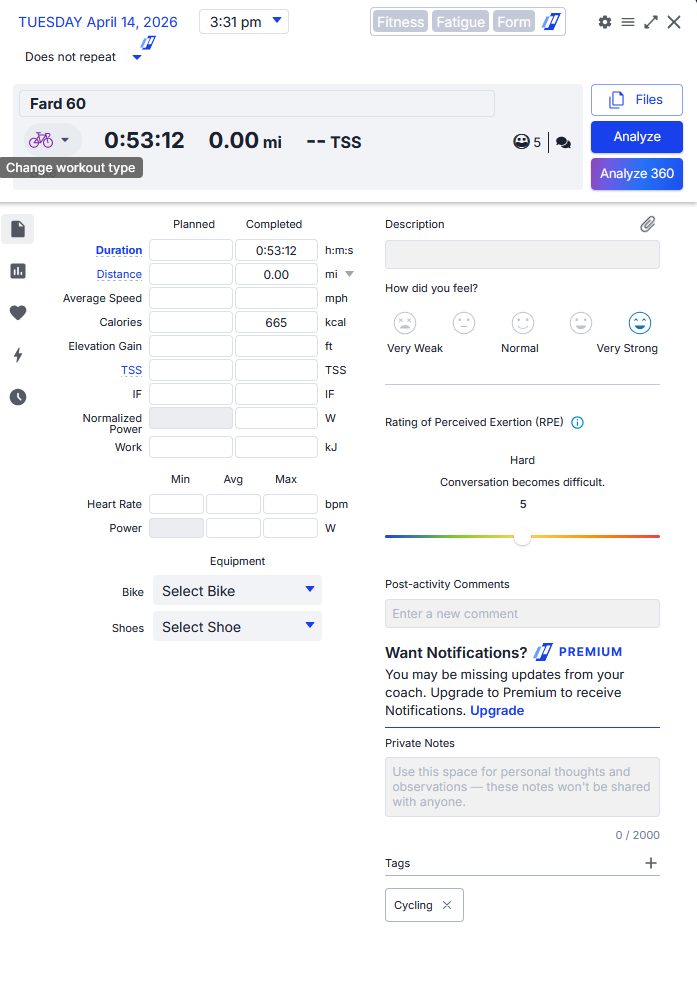
I completed a workout earlier today on my windows PC however I can find no record of it anywhere, neither in activities or trash can. I hit the save button on workout completion.
A few minutes later I did restart the app for the update if that is additional useful info.
I then tested again a few minutes ago starting and stopping a workout, and that did save/show in my activities - so possibly something to do with there being an update pending, or me doing the update a few minutes after completing the ride?
Very sorry about your lost workout. We try extra hard to never lose anything. I’ll double check that logic. Maybe right during save. We delete it. even if the save wasn’t completely successful. This PC app is only 2 weeks old, so there’s a few little weird issues showing up. I see our error logs here and we’re trying to resolve everything that we have seen, but I haven’t seen anything specific on save, but I’ll make 100% sure it’s saved before deleting our backup copy.
Yes, just confirmed, looked at the code. I can see that it deletes even if it crashes during saving or an error occurs. This will be fixed tomorrow. Sorry again.
Hey Alex, not to worry and thanks for the quick update!
What’s odd is about 45 minutes later, the workout then uploaded to trainingpeaks but with very little of the usual data. It only shows duration and kcal but none of the other metrics such as TSS, HR etc. However that workout is not showing in TD in history/activities/trash.
Oh, yes, I see it on your calendar as well. Somehow I didn’t save the stream data. There’s something unique about your device data, Can you tell me which training devices and devices you have? It’s probably something like a floating point heart rate or something like this that’s causing a problem.
Okay, I have both of those, so I can, I don’t know if I have the plus, but I have the pro. I have not tested mine with the PC version just to make sure, but we’ve put super safeguards in there now. This shouldn’t happen again. You can do like a 5 minute test 1st to make sure. Sometimes under one minute it won’t save, so it’s better to do 2 or three. New version coming tomorrow.
I did not test my kickr yet, worked fine with hrm-pro but I don’t think this was the problem, I am not sure what it was. I see some windows errors with permissions issues… but I don’t see your error specifically and you are the only one that reported a save/loss. The new version is available that should fix it with more safety checks in place and at the very minimum takes serious precautions not to lose anything.