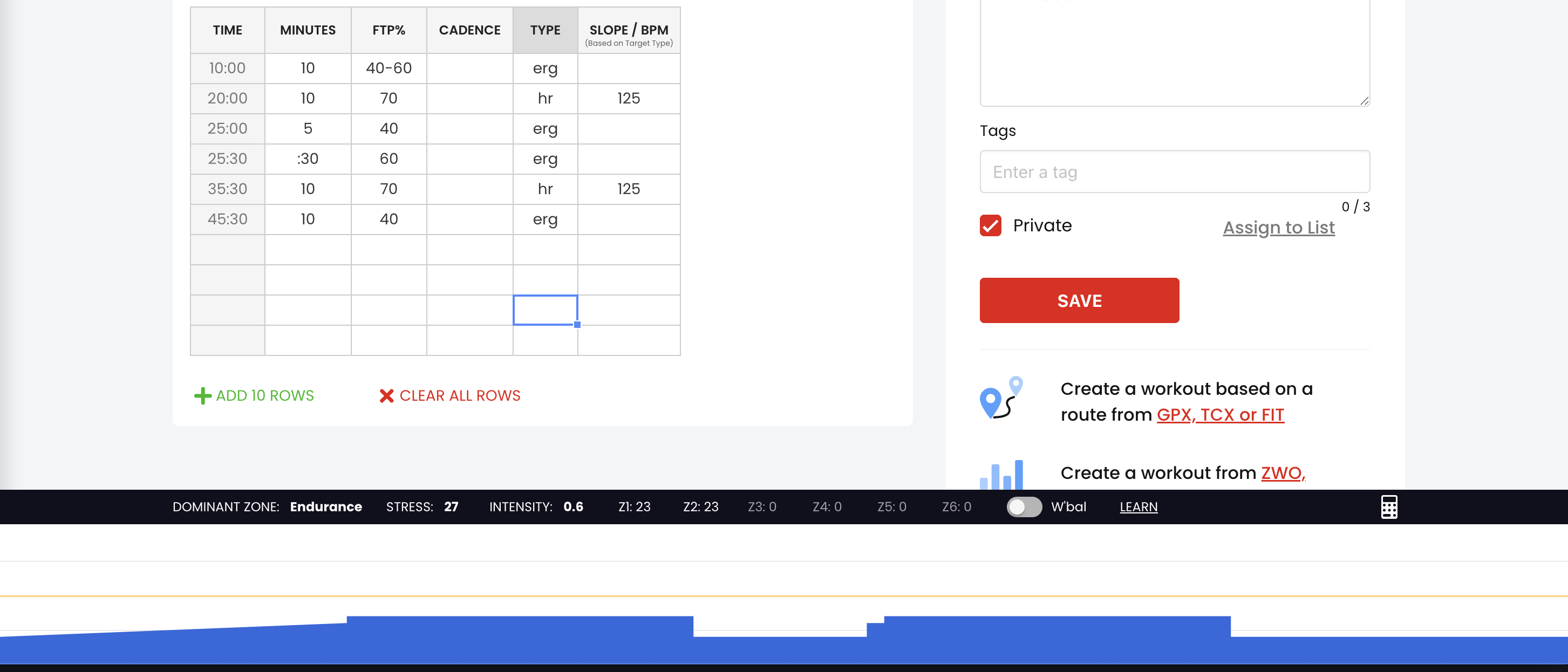
Hello to all! I’m a 78 y.o. male, riding a 3G Cardio recumbent exercise bike for CV fitness, rather than training towards specific goals. I’m interested in developing a few workout programs, and would appreciate assistance with a few issues:
I would like to edit a workout that has previously been saved. Specifically, I want to add an additional row in the middle of the workout, without disturbing the previous and following rows. In the case of a typical spread sheet there would be a command to “Insert Row”. I’m unable to accomplish this task in the TrainerDay web app on my Windows 11 PC.
I’m confused as to the way in which the heart rate value (max HR) which is inserted in the Slope/BPM column. Is this value a HARD LIMIT (at which point the program is alerted to reduce resistance/watts) or is it a TARGET (in which case the program will ramp up to that value). FWIW, I’m trying to set a HARD LIMIT.
Is it necessary to engage HR+ for any interval which has a value in the Slope/BPM column, or is this function automatic?
Other than the possibility of HR, does it make any difference what one selects from the drop down menu in the “TYPE” column (for example: warm-up, erg, cool down, etc.)?
Any guidance on these 4 topics would be most greatly appreciated!
It is a target with a bias to the downside, but it is not a HARD LIMIT.
HARD LIMIT max HR would very hard to do. To eliminate the risk of going 1 bpm over that limit during physical exercise would need a system that was very conservative indeed - it couldn’t risk letting you going within 10 bpm (or maybe more) of the HARD LIMIT.
It is possible to practically achieve (but not guarantee) if the athlete is content to ride smoothly - steady cadence, small changes in power etc. - but accounting for things like sprints, changing position, taking a drink / feed and other things (even someone unexpectedly coming into the room and surprising you) - is really hard to do if the max HR target is an absolute.
As an example, I do a HR+ ride with a constant HR target at ~71% of my HR max. My cadence is constant 90 +/- 3 rpm throughout and I am well practiced at this workout.
Even so, no matter what I try, there are always moments in the workout where I stray above that HR target, often by 5 bpm for a few seconds.
For that reason, the HR target is 5 bpm below the maximum that I don’t want to exceed.
But I would NOT rely on that meaning that I never went over that ‘maximum’ during the workout
It attempts to be a hard limit meaning as soon as it gets above 0 it reduces power but you can float between -3 bpm and 0 bpm but if you want a hard, hard limit reduce it by 5 as @Ivegotabike suggested.
hr, erg, and slope are 3 most popular options and only options that affect indoor. The other options have no effect other than for outdoor rides in some cases.
Thank you for your reply. By “TARGET” (versus “LIMIT”) I meant did the TrainerDay automatically ramp towards that segment’s target or did it respect the setting for the power and only take action if the specified BPM was reached? I understand that, given HR fluctuations, it would be virtually impossible to guarantee that the BPM threshold might not be briefly surpassed while the program and rider’s HR readjusted to the new power reduction (+/or reduced cadence).
Regarding HR+, would the idea be to set the power level higher than actually expected to be reached and allow the setting of the BPM to keep within range?
I’m still hoping that someone will answer whether or not the BPM value listed in the “STYLE” column is automatically active, or does HR+ need to be manually enabled for that segment.
Sorry if this is a double post. I thank you for posting that link, but I haven’t been able to replicate your results. Could you please explain (in words) what action(s) you performed after highlighting the columns of cells that were to be copied? Much appreciated.
I select the cells. I press key command or right click to copy. Move down one row and do paste. I am on a mac but windows is the same but different keys.
If you set the segment to be a hr segment, then HR+ is the active mode for that segment.
I would set the ERG power target a little bit lower than is expected to be reached. Later on in the interval, that is more likely to be useful to you if you need to switch into ERG mode.
You could also consider, as I did in the workout I mention in the Steve Neal tempo thread, having a ~1 minute ERG segment to get your HR up to close to the target and then switching over to HR+
Thanks, Alex. Right clicking my mouse didn’t work on that spreadsheet in Windows 11. However, Ctrl + C did copy the highlighted cells and Ctrl + V did move the copied cells to the cell on the next row. So, that problem seems to be solved. Now onward to row deleting…
Thank you for providing that link. I’m new to the concept of Watts/FTP % when considering my HR Max, since my previous exercise bike only displayed levels of resistance. Due to health reasons, I can’t perform an FTP test and (for the moment) have estimated my weight based FTP at 170, using 135 watts as approximately 80% of that number for a safe starting maximum. Therefore, I don’t currently know what FTP% would reliably correlate to driving me to that HR.
But I 'm still seeking clarity on 2 issues:
In those STYLE: BPM rows where you stipulated your maximum HR: what happens if your 85% FTP didn’t drive you to your maximum HR? Is the programs priority the 85% FTP or Maximum HR?
Is specifying a maximum BPM in a workout that you’re creating the equivalent of manually enabling HR+ in an “in progress” workout designed by someone else (from the available TrainerDay library) for the ERG segment?
I really do feel like I’m getting closer to getting a handle on the workout creating process with the help of the community!
So, the value for BPM is NOT PROTECTIVE of that row, but the DRIVER? HR, related to POWER, will certainly vary from day-to-day, based on external factors (such as fatigue). In order to best get a sense of any CV improvement, I would want to consistently exercise (for any individual workout) on a regular basis based on the segment’s specified FTP%, but not have the POWER increased past the given segment FTP% on a day when I was particularly “stronger” and my HR during that HR segment was below threshold.
In those STYLE: BPM rows where you stipulated your maximum HR: what happens if your 85% FTP didn’t drive you to your maximum HR? Power is increased to raise HR towards the target HR Is the programs priority the 85% FTP or Maximum HR? The HR target is the only target in HR+ mode If I switched to ERG mode during the interval, power would become the only target.
I don’t look at my workouts as “training”, but (at worst) maintenance of CV health. My structured indoor rides have always been essentially reproducible in profile, only changed “on the fly” when there was a need to reduce resistance because my HR exceeded my preferred maximum (when looking at the HR readout) on that day’s effort. It seems that I may have to do the same with my TrainerDay workouts: set the FTP%/Watts and manually reduce them “on the fly” if HR crosses the threshold, avoiding an BPM input in the “STYLE” column altogether.
Regarding my initial attempts at programming workouts, I hadn’t planned for any segment to force me to any % of my maximum HR, only to protect me from exceeding it.
My reason for subscribing to TrainerDay is to attempt to titrate any CV improvement, by comparing accumulated HR tracings, and subsequently raise my FTP when/if my HR does not regularly exceed the limit at the established 80% FTP, now that my new bike is FTMS capable.
Whatever works best for you of course, but I am now very firmly of the opinion that aerobic / cardiovascular health work is most effectively done with HR as the control, rather than only as the limit.
Using HR as the control (and merely observing power) would save you having to test / guess by how much to change your FTP when/if your HR “does not regularly exceed the limit…” I write that noting that many FTP test protocols are pretty good at pushing up HR to very high levels.
He is merging two ideas. 78 years old with heart issues and doctor gave him an HR limit, and wanting to do structured workouts. But that said once he figures out an approximate average power for his limit, he can just build his own creative workouts.
If his power limit at say 120bpm is 90w then he can do 50w ERG with no risk of hitting 120bpm. Then do 30 seconds of ERG at 85w and then switch to HR.
So more creative version of this. Where his max efforts are HR, and his lower efforts can be ERG. Or it could just all be HR segments with different values
So in ERG mode where we control the power we have to decide what number that is going to be, that means force you. We tell you to go 80w and you go 80w… so the only way for us to control power is in ERG mode. If you wanted a free ride with HR control that limits you, that would be some strange combination of slope mode and automated resistance control, this might be possible in some way but it’s kind of not really how these bikes work. So if you don’t want to go that hard all the time just reduce it or create intervals, but with intervals they are forced but with some creativity it’s possible to get what you want. If you are tired at being at your limit just click the button to switch to ERG and press the down arrows at the bottom or lower your HR target as you ride.
You can even have your HR intervls with say 125bpm target and 30% of ERG and pressing erg on the screen will instantly make it easy and manually adjustable.