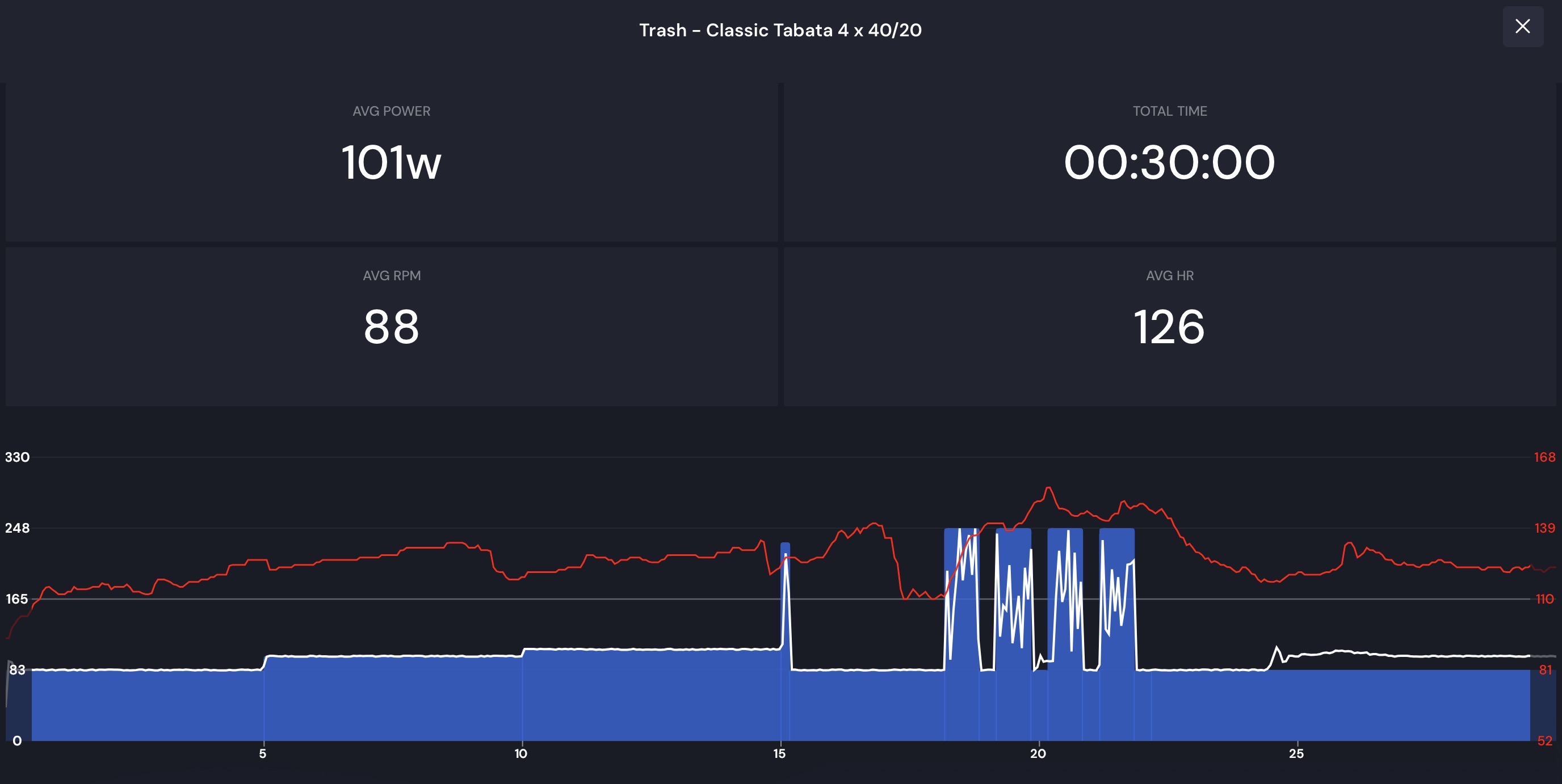
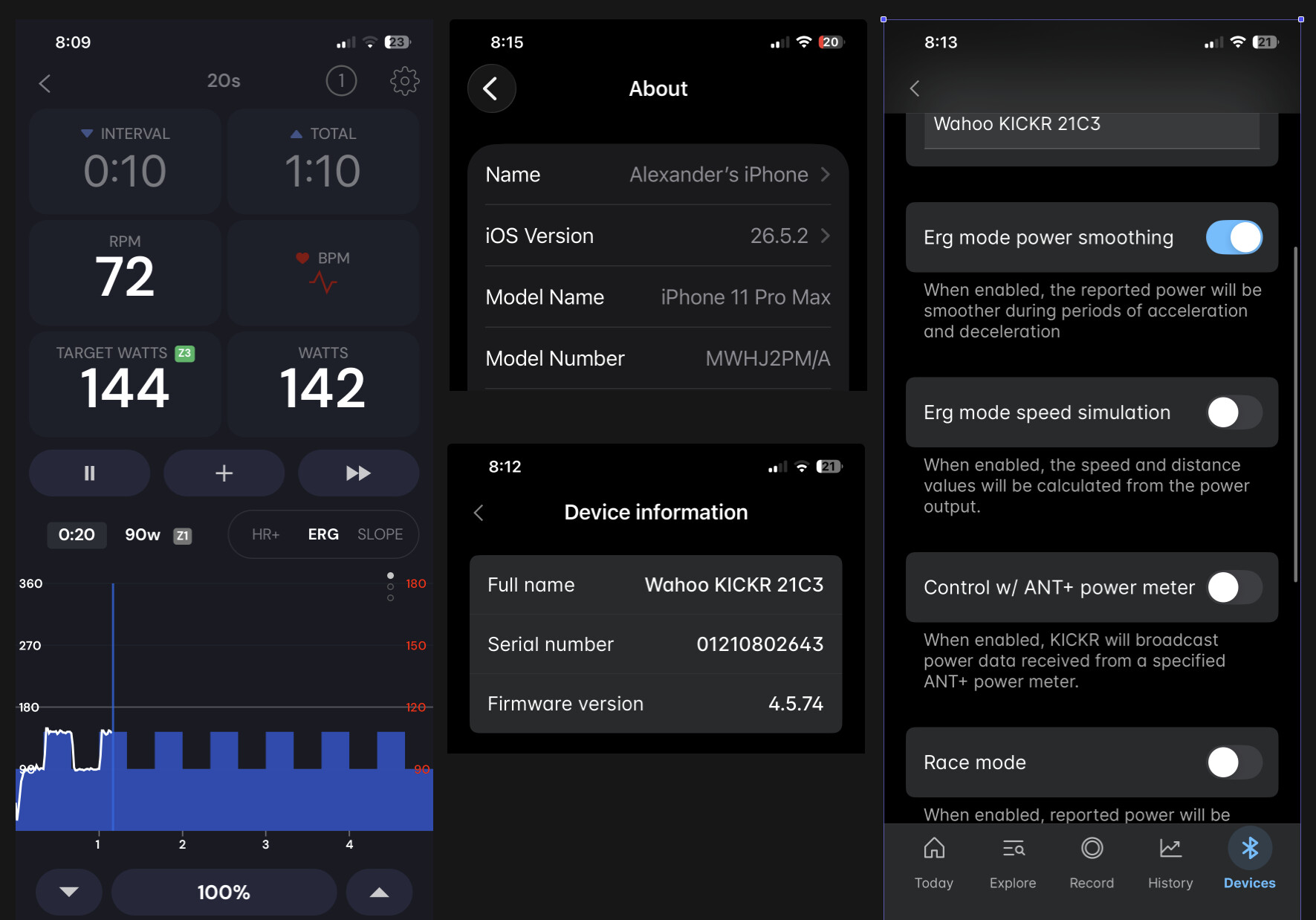
Hey, as of a couple days ago, after over a year of no issues, I am getting wild power fluctuations when in erg mode, and the interval is steady. I am using the mobile app, on iOS. This isn’t with short intervals, and I haven’t had issues with them in the past regardless. It’ll be a 3-5min interval, at say 225w, and it’ll hold at 225 for a second or two, then drop to 160, then ramp up, hold and drop again. Its not a couple watts, its 50 or so. This happens at higher power, and lower power, as well.
I experimented with power smoothing on/off, redownloaded the wahoo app (using a kickr V5) and updated firmware, power smoothing on/off on the kickr itself, all the things I could think of. Turn off the kickr and reconnect, disconnect reconnect….
I did download mywhoosh or whatever, and it held power steady, so I don’t think its my kickr.
Oh I think I responded to your email. What I can see looking at your last workout is is that it seems as though your trainer is not being controlled at all. I would make sure your kickr is not paired directly to your phone (android/ios phone settings, forget). Maybe phone restart, maybe app reinstall. No one else with V5 or similar has reported such an issue. Only V1 users with a problem but V1 and V5 are totally different. We did not change our app recently so something randomly occured.
So, if I am trying to track with my garmin, and also use trainerday on my phone (iOS), what should be connected and where?
I reached out to wahoo, and he had me forget the trainer from everything, then just connect to wahoo, then forget and try on trainerday again. It worked real quick, then I went for a walk, came back and it was back to not working. I tried a manual erg workout from the wahoo app, and that worked. Very odd that it just started happening.
Had this happen today, recent subscriber ~1wk, and second time non-Z2 HR+. Set to ERG mode after I began workout. Maybe switch from HR+ to ERG is aggregating factor?
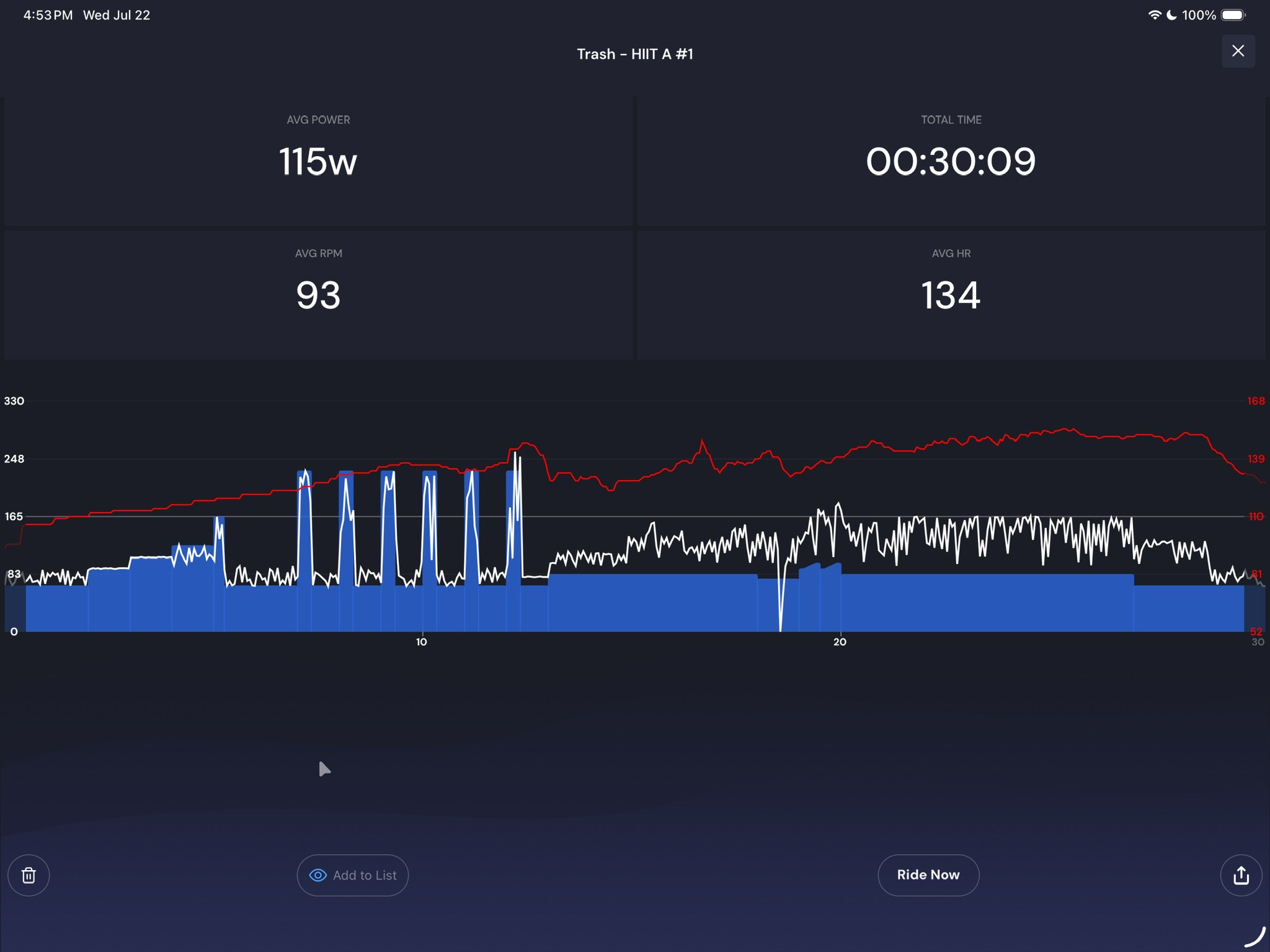
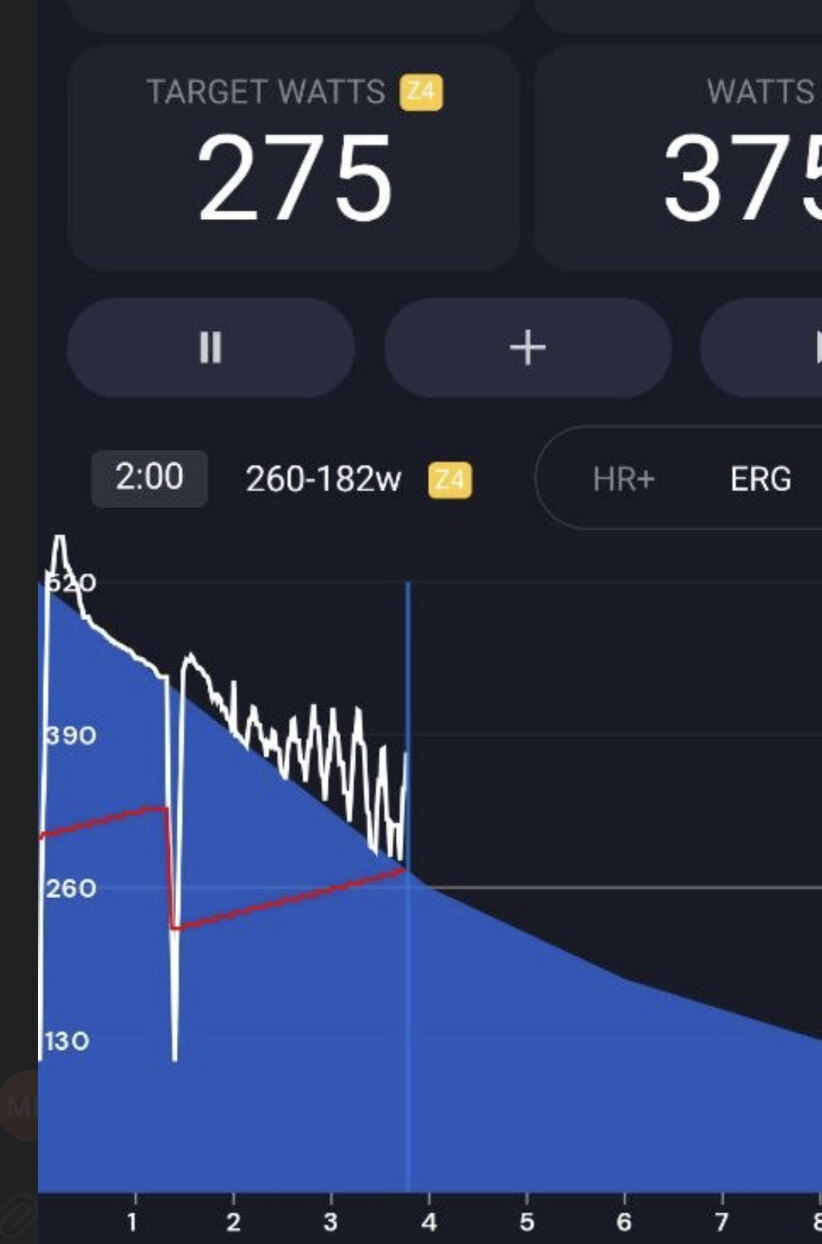
As you can see chaos. It was hilarious. Not what I was hoping for today, but tomorrow is another day to try again.
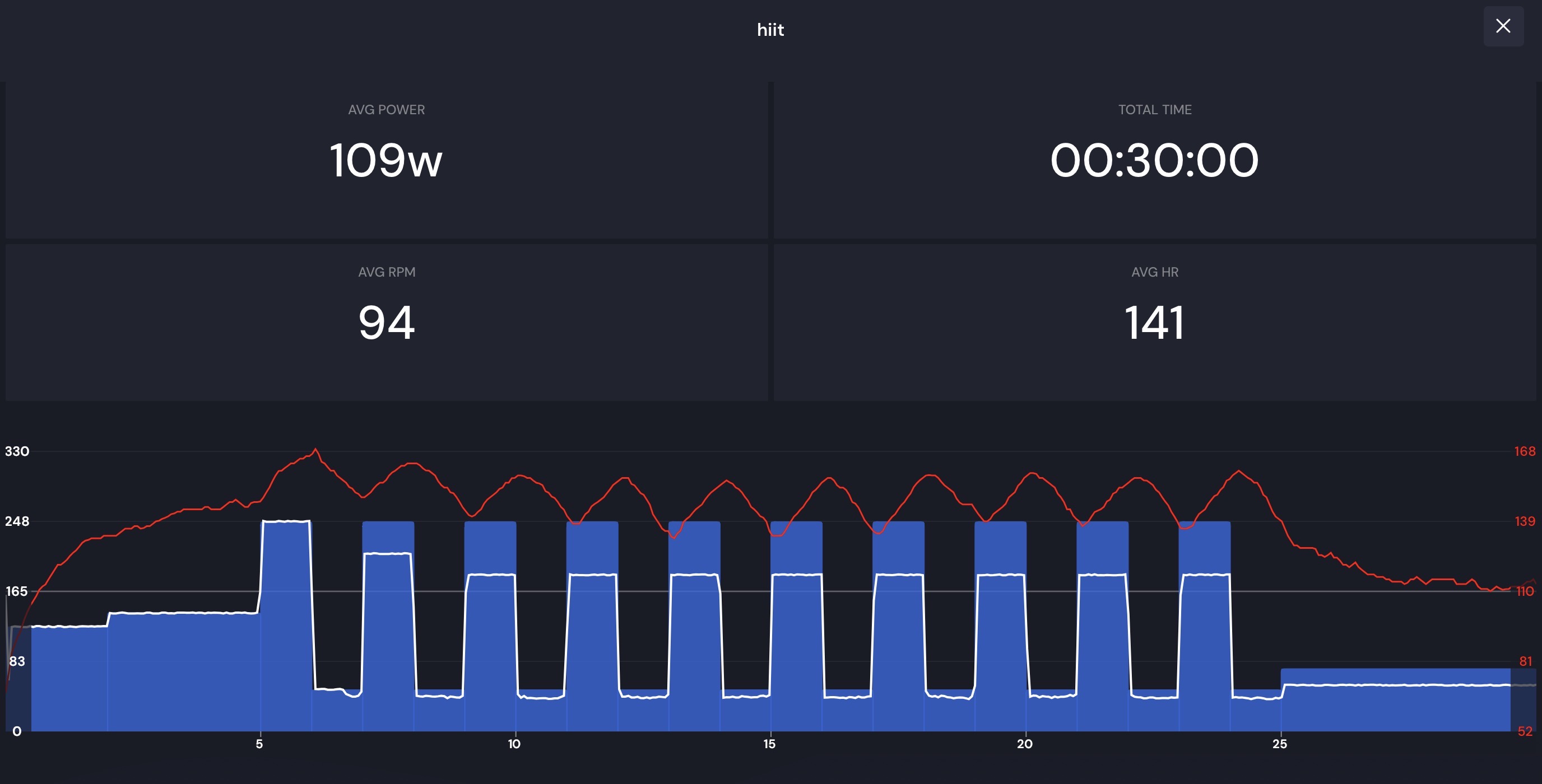
Prior HIIT, last week, was good. Power ramp felt different than I was used to but that’s fine. Also note I lowered intensity after first and second intervals.
Morpheus on the iPhone, which also captures HR strap telemetry
Apple Watch Ultra 2, is not paired with TrainerDay but do record as secondary HR source for Apple Cycling workout.
TrainerDay paired with Kickr Bike + HR Strap
I’ve now lots of free time, willing to help diagnose and get hands dirty getting involved. I was actually in the process of coding up my own replacement for TrainerRoad when I did marketing research and came upon TrainerDay.
It’s very strange. I don’t know what to say. I am not sure how the kickr bike works regarding gearing but it seemed fine at low power and a problem at higher power. I would not think it would matter with the kickr bike but strange.
I still have not managed to solve my issue. It’s fine at lower power and the drop out for me right now is not a major issue, but as the power does go up the drops seem larger. My system is too fragile at the moment to really test this myself and see if this would still be the case at say 300 or 400 watts, but I suspect it would be. Even at the low low power of 100 watts its more frequent and larger than at 80-90 watts.
I do have another trainer in a jet black victory that is supposed to be brand new that I could test this out and see if its isolated to just the wahoo brand.
I’ve a suspicion this might be related to recent updates to Apple’s BT stack fixing security issues. TDB, need more data points.
Last night I noted my HR strap (BT) reporting about 10bpm off (high) compared to Apple Watch. It helped the ride was HR+ Z2, thus power was lower than I expected for the reported HR.
Notably HR cycled high with fall over few seconds, correcting reading, and it repeated. Intermittent BT interference / drops? I generally trust EKG straps over optical, but here was the opposite. Made me wish I was wearing my Wahoo optical armband for a 3rd reading.
Intermediate diagnosis, I disabled BT audio and stopped streaming background YT lecture. That seemed to clear it up, but I’d not say that’s conclusive evidence. It could also be I didn’t wet the band sufficiently to acquire good HR signal, and by middle of ride perspiration was sufficient.
Ultimately I don’t expect to root cause this one. It’ll likely clear up. Ghost in the machine.
Just finished another HIIT attempt. Crazy fluctuations same as last attempt. Removed all variables I could. Tried varying cadence. Tried stop+start. Tried toggling HR+ → ERG → SLOPE → ERG. Same chaos result.
After the intervals I decided to try saving the workout by increase % FTP, ultimately hitting 200% FTP, but as the graph shows TD barely hit FTP.
Could this be something with how the workout is authored?
About half way through the ride a banger track came on, actually the entire “Space 92 at CRSSD Festival Spring 26” hits, favorited it. Then the next track, another banger, so I tapped add album to library. Once the DL started HR went wonk, bpm went from 126 → 145 over 5-10s contradicting Apple watch.
That’s very interesting! I haven’t been responding, apologies. I actually tried a different app (with less ride options…) and it’s working fine. Because I don’t have a ton of time to futz with it in the morning I am going with easy for right now. I am definitely watching to see if there is a resolution though.
I tried both my trainers and the same issue is still happening with both of them.
@aegisofpaean are you saying to disable wifi on the device running TD? I use my iphone and prior to June 17 never had this issue. I haven’t changed my set up since I got the kickr core in November 2025. I could try disabling the wifii on the phone when i ride today and see if that resolves the issue, the trouble i have with this is my cell service isn’t the greatest soemtimes.
I have not updated the IOS in a long time. I don’t routinely update it. So an IOS update is ruled out. I did update it today and have deleted and redownloaded the TD app. Maybe the latest TD and the old IOS didn’t play well together? I’ll give it another try later today.
Yes, that’s my next attempt at resolution. The objective is remove WiFi & BT interference on 2.4ghz band, contention on wireless chip/driver, and most importantly remove as many variables as possible and gain purchase on path to solution. I’ll have another ride this evening to test that out.
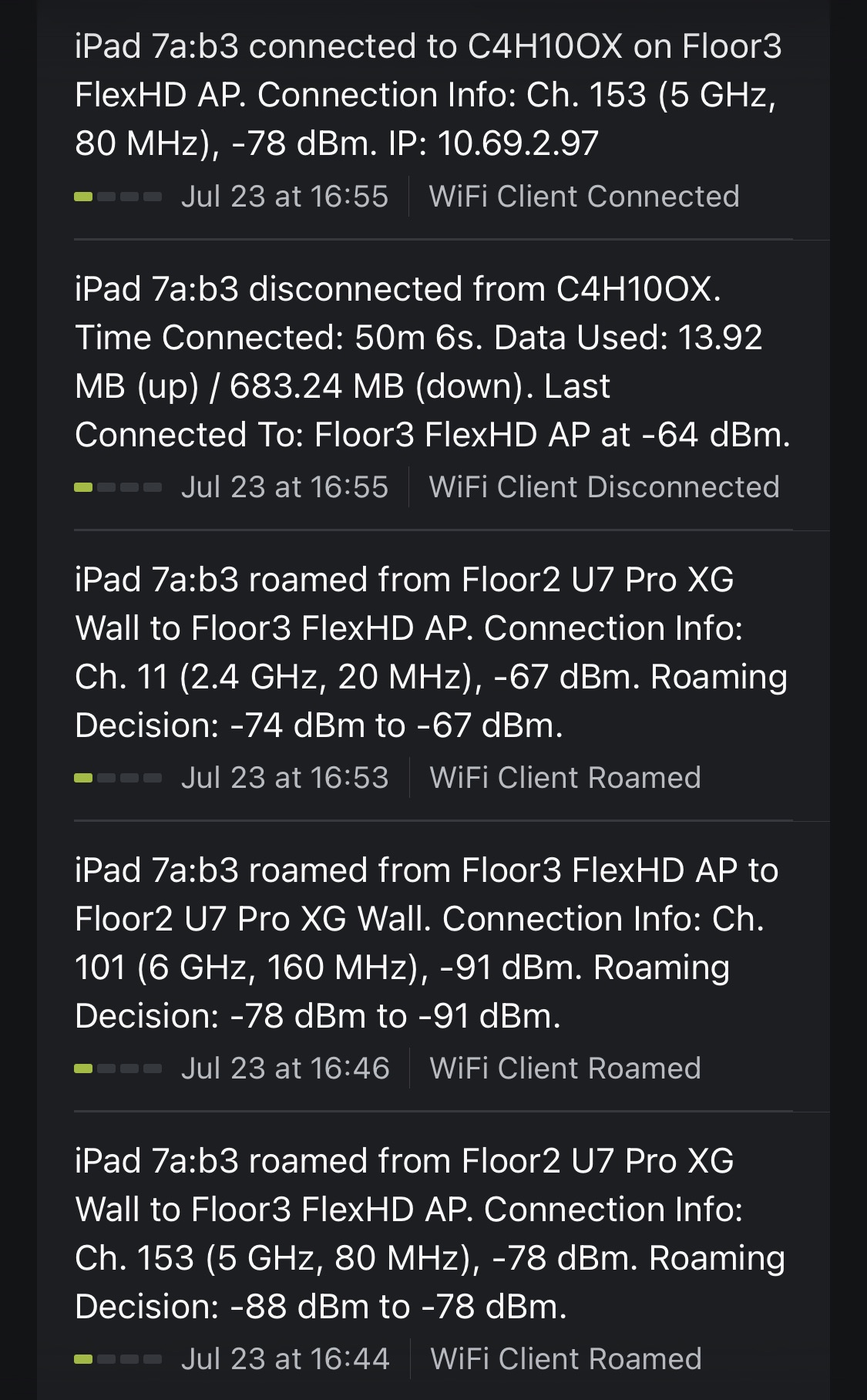
Entirely possible not related to an iOS/iPadOS update. Could be background app (doubtful); recently noted the Tesla app is consuming more power than normal, a restart addressed it. I run Ubiquity network gear and have it optimize WiFi channels nightly in my congested area, which can cause intermittent issue where my kit is located, e.g. uptick in roaming between APs. End of June one AP had a firmware update, I know from experience that can cause issues but unlikely given how far back that was. Recently started restoring a few old MacPros right above where I cycle, which may increase interference.
There are a lot of variables! We’ll get to the bottom of this, I really want TD to work for me.
Bluetooth headphones can cause issues. I have heard of wifi causing issues in the past and people set specific wifi channels to fix it. Yes lots of potential failure points, most people don’t experience this but some people have a lot more issues for some strange reason(s).
Ok good news, my tester was able to reproduce this with a strange workout, or something similar. Hopefully if we fix this issue it will resolve what you guys are seeing. I thought it was a control issue but maybe it is a data reading issues, that only has affect in some rare cases.